

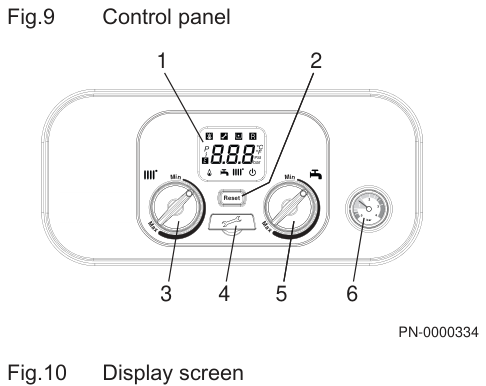
Set the heating flow
Typical target is about 55°C if the house still warms. The display shows the temperature you set. The usual range is about 25°C to 80°C.
- Turn the left radiator knob (3). Clockwise raises the flow. Anticlockwise lowers it.
- Watch the display and stop around 55°C.
- Leave the right-hand tap knob if you only came to lower the heating.
If an OpenTherm controller is connected, your installer will have told you. In that case change the heating temperature on the controller, not on this panel.
A heat-only Eco Compact has one rotary knob instead of two. That knob is still the heating flow. On a heat-only boiler it must sit hotter than the cylinder thermostat if the boiler also heats the stored hot water.
If your fascia is two grey knobs and a red display, use the Combi Eco steps.
Look up your exact model on Boiler Manuals if the fascia does not match. Then return to the Main flow-temperature page or the Boiler Optimiser.