

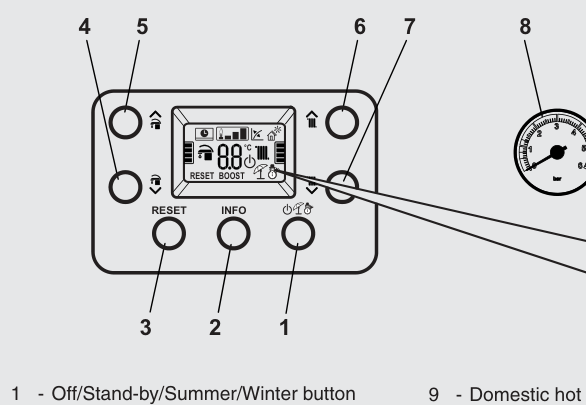
Set the heating flow
Typical target is about 55°C if the house still warms. When heating is on, the display shows the water temperature leaving the boiler to the radiators.
- Press the Mode button (Off / Stand-by / Summer / Winter) until Winter is selected. Winter is heating and hot water. Summer is hot water only, with heating off even if the room controls ask for it.
- Use the heating temperature buttons: one increases the heating set temperature, the other reduces it. Leave the domestic-hot-water up and down buttons if you only came to lower the heating.
- Stop when the display shows the flow you want.
If an outdoor weather probe is fitted, the display shows a weather-compensation symbol and the heating buttons no longer set °C. They set a curve from 1 to 9. For example, line 6 gives about 60°C flow when it is 10°C outside. That is still radiator water temperature, not room temperature.
Look up your exact model on Boiler Manuals if the fascia does not match. Then return to the Alpha flow-temperature page or the Boiler Optimiser.