Run a Test Program
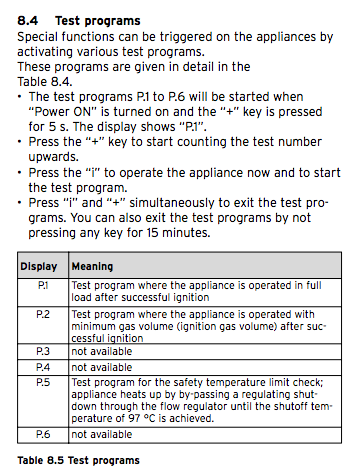
By running a test program allows the sequential activation of special functions to test your boiler. The test programs are activated by pressing the Power 'ON' switch and '+' simultaneously for 5 seconds.
Activation: Press the Power 'ON' switch and '+' simultaneously for 5 seconds.
Navigation: By default 'P.0/P.1' will display. Scroll by pressing the '+' button.
Start Test: Press the 'i' button to start the unit and test the selected program.
Abort: A test program can be aborted at any time by pressing the 'i' and '+' buttons simultaneously.
Test Program Modes
For information on each Test Program refer to the table below:
| Code | Test Program | Meaning |
|---|---|---|
P.0 |
Purging mode | Test program used for purging air and placing divertor valve into middle position with pump cycling periodically. |
P.1 |
Maximum fire Test Mode | Test Program used when the unit runs at full load after successful ignition. |
P.2 |
Minimum fire Test mode | Test program used when the unit runs with minimum gas consumption after successful ignition. |
P.5 |
STB Testing | Program for STB (Safety Temperature Limiter) testing; the device heats up, bypassing the regular shutdown procedure, until it reaches the STB shutdown temperature of 97°C. |
Important Notes
The information provided above is from the Vaillant Ecotec Installation manual. For newer Ecotec models, please use the installation assistant provided with your boiler.