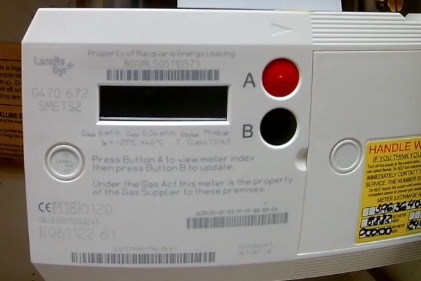
Need to add credit to a prepaid gas meter yourself? Use the steps below for the two most common meter styles.
2 Button Meter Manual Top-Up
Landis+Gyr Digital Smart Meter
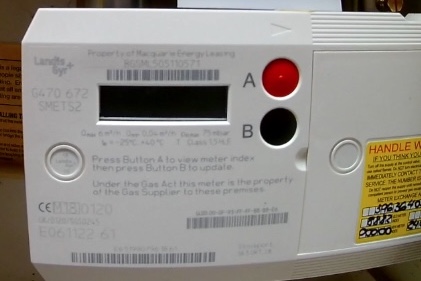
Here’s how to manually top up your gas using the meter:
- Press button A to wake the screen,
- then press it twice to get to Credit Entry
- Press button B, then A to enter the code and short press B to move forward to the next digit.
- Finally press and hold button B to submit.
If you make a mistake, repeatedly short press B to get back to the correct digit.
Liberty Gas Meter (Keypad Style)
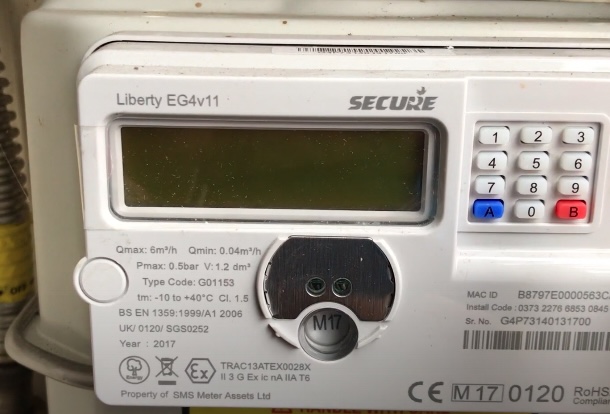
- Press the blue A key to start. The screen will show VEND MODE.
- Type your 20-digit code on the meter keypad.
- Once started, the blue A key becomes a delete button, so you can go back and delete one number at a time.
- When you’ve entered all 20 digits, press B. Your meter will then either accept or reject the code.
If it accepts it, you’ll see ACCEPTED, then the amount of the top-up, and ADDED.
If you type in the wrong code 5 times, the display will show KEY LOCKED for 20 seconds and block input for that duration.
Information is guidance only; repairs require qualified professionals. Affiliate links may earn us commissions at no extra cost. Do your own due diligence; we accept no liability.